- Startpagina /
- Elektronica /
- Computer Accessories /
- Computer Accessories & Peripherals /
- USB Hubs /
- USB Video Transmission Hub, 2-in-1 Adapter Co...
0 ratings






Artikelnr.:
142678337
USB Video Transmission Hub, 2-in-1 Adapter Converts USB to HDMI for Laptops Lack HDMI or Fully Functional Type-C Ports, Compatible with Windows & Mac
Artikelnr.:
142678337
€ 34
Price Details
Excluding Shipping & Custom charges ( Shipping and custom charges will be calculated on checkout )
*All items will import from VS
0 ratings
Schrijf een beoordeling
Op voorraad
 Geïmporteerd uit USA
QTY:
Bestel nu en ontvang het rond Woensdag, Juni 24
Beveiligde transactie
Ubuy works hard to protect your security and privacy. Our advanced payment security system ensures confidentiality by encrypting your information during transmission using AES (Advanced Encryption Standards) and SSL (Secure Socket Layer) protocols. Your payment details are 100% secure as we do not share your payment details with third party sellers.
Onze beste bezorgdiensten


Transform your laptop into a powerful productivity hub with the 2-in-1 USB Data to Video Signal Conversion Cable!

Koop nu, betaal later

Spoedbestelling

Gratis
retourneren*

Stevig verpakt

100% Origineel product

PCI DSS Compliance

ISO 27001 Certified


Note: Step Down Voltage Transformer required for using electronics products of VS store (110-120). Recommended power converters Nu kopen.


Wat opvalt
Veelzijdige Compatibiliteit
Works seamlessly with Windows and Mac laptops, including M1, M2, M3, and M4 chips, providing a flexible solution for devices lacking HDMI or functional Type-C ports.
2-in-1 Convenience
Combines data transfer and video signal functions in one cable, eliminating the need for multiple connectors and simplifying device connectivity for users on-the-go.
Hoogwaardige video
Ensures reliable video output without sacrificing quality, delivering smooth and clear visuals for presentations, streaming, or gaming on devices without standard ports.
Productdetails
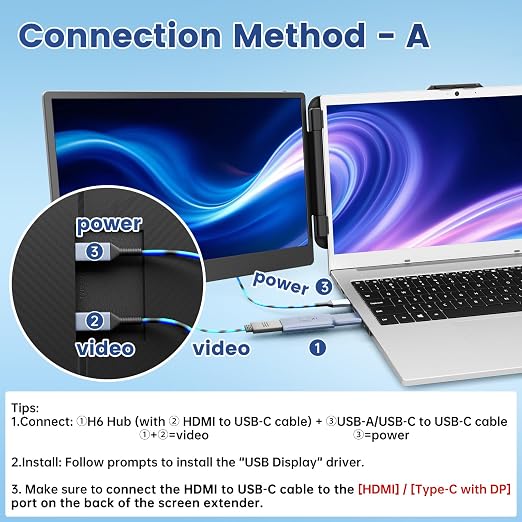
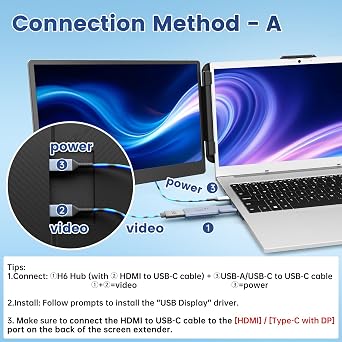
- 【Product Features】The H6 Hub is a versatile 2-in-1 solution that converts standard USB-A and non-video USB-C ports on your laptop into functional video outputs, enabling easy connection to external displays or Kefeya screen extenders even without dedicated video ports.
- 【Compatibility】Enjoy broad compatibility with both Windows and macOS systems, including Apple M1/M2/M3/M4 MacBooks, and seamless pairing with Kefeya laptop screen extenders (S1, S2, S3, S5, S6, KX2 models).
- ❗【Note】[1] Driver installation is required. [2] You will also need to provide your own USB-C to HDMI cable and connect it to the Type-C (with DP) or HDMI port on your display device. [3] H6 can only convert USB-A and non-full-function USB-C ports to video output ports, does not provide power. Before using the H6 hub to connect laptop to an external display, please connect the power cord to the external display first.
- 【Driver Installation】After inserting the H6 hub, locate the “USB Display” driver installation file on your laptop. For Windows systems, simply double-click the driver file to run it. For Mac systems, after installing the driver, follow the on-screen prompts to move the application to the “Applications” folder. Access your privacy settings to enable the USB Display program, thereby activating video transmission functionality.
- 【Portable & Reliable Service】Designed for convenience, the H6 Hub delivers clear 1920x1080p video output while weighing only 25g for ultimate portability. Should you need assistance, our support team aims to respond within 24 hours.
| Connector Type | Usb-a & Type-c |
| Kabeltype | USB |
| Compatibele Apparaten | M1 MacBook, M2 MacBook, M3 MacBook |
| Andere speciale kenmerken van het product | Lightweight, USB Video Transmission |
| Compatibele telefoonmodellen | Geen compatibele telefoonmodellen |
| Connector Geslacht | Male-to-Female |
| Data Transfer Rate | 5 Gigabits Per Second |
| Aantal pinnen | 9 |
| Aanbevolen toepassingen voor product | Laptop screen extension and video/data signal transmission |
| Binnen Buiten Gebruik | Binnen |
| Merknaam | KEFEYA |
| Modelnaam | USB Video Transmission Cable |
| Klantpakkettype | basic shipping box |
| Model | H6 |
| Fabrikant | Shenzhen Baijiayoupu Technology Co., Ltd |
| Onderdeelnummer | H5-T |
| Kleur | Zwart |
| Item Vorm | Rond |
| Merk | KEFEYA |
| Speciale functie | Lightweight, USB Video Transmission |
| Artikelgewicht | 0.15 lbs (70 grams) |
Voor wie is dit geschikt?

-
Reizende Professionals
Ideal for users needing quick external display solutions while on the go with laptops lacking HDMI ports.
-
Older Laptop Users
Perfect for individuals using older laptops that do not support modern video output like HDMI or Type-C.
-
Budgetbewuste consumenten
A cost-effective option for users seeking video output without upgrading their entire laptop system.

-
Gaming Enthusiasts
Not suitable for gamers needing high-resolution video output, as performance may be limited compared to HDMI.
-
Professionals in Design
May not meet the demands for high-quality video signals required by designers or video editors.
-
Large Displays Users
Not recommended for connecting to large screens, as compatibility and performance may diminish with screen size.
PRODUCTBESCHRIJVING
Heeft u een vraag? Chat met ons
Vragen & Antwoorden van klanten
-
vraag:
What is a USB Video Transmission Cable?
antwoord: A USB Video Transmission Cable is a specialized cable designed to convert USB data signals into video signals, allowing you to extend or mirror your laptop display. This 2-in-1 cable specifically supports M1, M2, and M3 MacBook models, making it an ideal choice for users needing additional screen real estate. By connecting this cable to a compatible monitor or projector, you can enhance your workspace or project multimedia content seamlessly. Use cases include presenting during meetings, multitasking with multiple applications, or simply enjoying a larger display for gaming or video editing. -
vraag:
Is this cable compatible with all MacBook models?
antwoord: This USB Video Transmission Cable is specifically tailored for M1, M2, and M3 MacBook models. It may not function optimally with older MacBook models, so it's crucial to check compatibility before purchase. The design caters to the powerful features of newer MacBooks, ensuring efficient data and video transmission. This allows users to extend or mirror their screens effortlessly, making it perfect for professionals needing additional productivity or students requiring a larger view for study presentations. -
vraag:
How do I set up the USB Video Transmission Cable?
antwoord: To set up the USB Video Transmission Cable, simply connect one end to your MacBook and the other end to the HDMI port on your external display. Once plugged in, your Macbook should automatically detect the external screen. You can adjust display settings in System Preferences to optimize your setup. This quick process allows you to efficiently extend or mirror your display in mere minutes—ideal for presentations, graphic design work, or watching movies on a bigger screen. -
vraag:
What resolutions does the cable support?
antwoord: This USB Video Transmission Cable supports high-definition video resolutions, typically up to 1080p. This ensures clear and crisp visuals whether you're watching movies, playing games, or video conferencing. The cable’s ability to maintain high-quality video output makes it practical for professionals, gamers, and anyone wanting a better viewing experience on larger screens. By providing reliable video quality, you can enjoy your favorite content without compromising on demand for performance. -
vraag:
Can I use this cable for gaming?
antwoord: Yes, the USB Video Transmission Cable is suitable for gaming, especially when using M1, M2, or M3 MacBook models. It allows for a smoother gaming experience by enabling you to connect to larger displays that deliver immersive visuals. This is particularly beneficial for games requiring detailed graphics or fast responses, ensuring you have an edge in competitive gaming. Whether you're playing casual games or graphic-intensive titles, this cable helps enhance your gameplay. -
vraag:
Does this cable enable audio transmission as well?
antwoord: Yes, this cable supports audio transmission alongside video output, allowing you to enjoy synchronized sound while using external displays such as TVs or monitors. This feature is especially valuable for watching movies or streaming content where audio quality complements the visual experience. By supporting both video and audio signals, it simplifies your setup and eliminates the need for additional cables, making it more convenient for users seeking an all-in-one solution. -
vraag:
What materials is the cable made from?
antwoord: The USB Video Transmission Cable is constructed from high-quality materials that ensure durability and efficient signal transmission. Typically, the cable features a robust outer shell to withstand flexibility and wear, while the internal wiring is designed to minimize signal loss. This attention to quality means you can depend on it for regular use without the worry of degradation over time. Whether in a home office, classroom, or gaming setup, this cable stands up to the demands of an active lifestyle. -
vraag:
Can I use this cable with non-Apple devices?
antwoord: While primarily designed for M1, M2, and M3 MacBook models, this USB Video Transmission Cable may work with other devices that support USB and video over USB standards. However, compatibility is not guaranteed with non-Apple devices. Before using it, check whether the other device supports the appropriate video output format. This flexibility allows users with multiple device ecosystems to still benefit from the cable, enhancing its versatility across varied technology setups. -
vraag:
What is the length of this cable?
antwoord: The typical length of this USB Video Transmission Cable is around 6 feet, providing ample distance for connecting to external monitors without feeling restrictive. This length is particularly beneficial in settings where your laptop needs to be placed away from the display, such as during presentations, or if you want more freedom in your workspace. With this ideal length, you can create a comfortable and organized desktop setup tailored to your specific needs. -
vraag:
Where can I buy USB Video Transmission Cable, 2-in-1 USB Data to Video Signal Conversion Cable Laptop Screen Extender, Compatible with M1/M2/M3 MacBook?
antwoord: You can purchase the USB Video Transmission Cable on Ubuy in Netherlands. Ubuy offers a wide range of products, ensuring that you can find this specific cable with its compatibility features and reliable specifications. By choosing Ubuy, you ensure access to quality products with streamlined purchasing options, making it a preferred platform for tech needs.
KEFEYA USB Hubs Editorial Review
** USB Video Transmission Cable** The USB Video Transmission Cable presents an innovative solution for extending the display capabilities of laptops, particularly for users with M1, M2, and M3 MacBooks. Despite its promise, the user experience reveals significant inConsistencies and frustrations that Prospective buyers should Consider before purchasing. Customers report severe issues with the product’s instructions, often describing them as inadequate. A common sentiment is that the lack of clear guidance leads to confusion, especially regarding driver installations; many found it unnecessary to download any software on Mac but felt misled by the documentation. Users have spent Considerable time troubleshooting, particularly with initial connectivity problems. While some customers managed to get the cable functioning, their satisfaction quickly waned due to software compatibility challenges and lackluster customer support from the manufacturer. Reports of devices disconnecting abruptly during use have contributed to substantial dissatisfaction, hindering productivity when relying on an extended display. Moreover, instances of unresponsive customer service have left users feeling abandoned. Overall, while the USB Video Transmission Cable has the potential to enhance the productivity of users seeking to extend their displays, significant user experience issues – from unclear instructions, software problems, to minimal support – have led many to question its reliability and value. **
Klantbeoordelingen en -waardering
20 klantenbeoordelingen
-
5 ster
43%
-
4 ster
26%
-
3 ster
0%
-
2 ster
7%
-
1 ster
24%
Beoordeel dit product
Deel uw mening met andere klanten
Voordelen
- Ability to extend display capabilities for laptops
- Compatibility with new MacBook models (M1/M2/M3)
Nadelen
- Ambiguous and inadequate instructions
Prijs-/productgeschiedenis
Belangrijke informatie
- Beperkingen: voor producten die internationaal worden verzonden, gelieve er rekening mee te houden dat eventuele fabrieksgaranties mogelijk niet geldig zijn; ondersteuningsopties van de fabrikant zijn mogelijk niet beschikbaar; producthandleidingen, instructies en veiligheidswaarschuwingen zijn mogelijk niet in de taal van het land van bestemming; de producten (en bijbehorende materialen) zijn mogelijk niet ontworpen in overeenstemming met de normen, specificaties en etiketteringsvereisten van het land van bestemming; en de producten zijn mogelijk niet in overeenstemming met de voltage- en andere elektriciteitsstandaarden van het land van bestemming (waardoor het gebruik van een adapter of omvormer nodig is, indien van toepassing). De ontvanger is ervoor verantwoordelijk zich ervan te verzekeren dat het product rechtmatig kan worden geïmporteerd naar het land van bestemming. Bij het bestellen bij Ubuy of diens partners geldt de ontvanger als de geregistreerde invoerder en dient zich als zodanig te houden aan alle wetten en voorschriften van het land van bestemming.
- Omdat Ubuy een wereldwijde zoekmachine is, zijn niet alle producten die op Ubuy worden vermeld ook te koop. Producten zijn onderworpen aan wetgeving inzake export en handel.
€ 34
Bestel nu en ontvang het rond Woensdag, Juni 24
Dit product is wel in mijn land verkrijgbaar. (Klik op de knop hierboven als dit artikel wel in jouw land verkrijgbaar is. Ons team zal het controleren en aanpassen.)
QTY:
Beveiligde transactie
Ubuy works hard to protect your security and privacy. Our advanced payment security system ensures confidentiality by encrypting your information during transmission using AES (Advanced Encryption Standards) and SSL (Secure Socket Layer) protocols. Your payment details are 100% secure as we do not share your payment details with third party sellers.
Onze beste bezorgdiensten
Snelste wereldwijde bezorging
Kenmerken en voordelen
- 2-in-1 design converts USB-A and non-full-function USB-C to video output.
- Compatible with Windows & Mac (M1/M2/M3/M4), solving compatibility issues.
- Supports connection to various laptop screen expanders for larger displays.
- Lightweight, durable cable with 1920x1080P output resolution.
- Easy installation with driver provided upon insertion.
- Reliable customer service available for troubleshooting within 24 hours.